Back to Course
AA Top Teacher Theory vol 2_1: Classroom Activities
0% Complete
0/0 Steps
-
From Theory to Plan: Translating Principles into Lessons32 Topics
-
(A) From Theory to Lesson Plans
-
1. One-Page Lesson Plan Template (fillable)
-
2. Lesson Structure and Timing — Practical Rules of Thumb
-
3. Mapping Theory to Plan — How to Translate Constructs into Steps
-
4. Sample: Filled Lesson Plan (60 min) — Calculating Combinations (no probabilities)
-
5. Formative Question Bank (quick checks to map to objective & ZPD)
-
6. Quick Teacher Checklist — Before, During, After
-
7. Practical Tips & Pitfalls (12 + concise cautionary notes)
-
8. Short theoretical mapping (why this works)
-
9. Short Rubric Example (for counting/permutation lesson)
-
(B) Learning Objectives and Outcomes
-
1. Principles: What makes a good objective
-
2. Translate objectives into student‑friendly outcomes
-
3. Checklist for writing objectives & outcomes
-
4. Mapping objectives to the lesson structure
-
5. Worked example — 9th‑grade biology lesson
-
6. Quick teacher templates
-
7. Common pitfalls and how to avoid them
-
8. Final checklist before you teach
-
(C) Sequencing & Pacing
-
Micro‑sequence: the lesson template (for ~60-minute lesson)
-
Macro‑sequence: mapping a two‑week unit
-
Two‑week (10 × 60‑minute) pacing guide — ready to adapt
-
Justifying method choice (how to explain to students / why they’re doing it)
-
Monitoring progress & adjusting pace (practical cues)
-
Quick checklist for teachers (before each lesson)
-
Practical Example: 45-minute Lesson Plan
-
(D) Differentiation & Inclusion Strategies (summary)
-
Assessment & Checks for Understanding
-
Extensions & Cross‑Curricular Ideas
-
Common Student Errors & Teacher Prompts
-
Teacher Notes / Script Highlights (select phrases you might say)
-
(A) From Theory to Lesson Plans
-
Active Learning Strategies44 Topics
-
(A) Think-Pair-Share and Variants
-
Core TPS structure (teacher-script + timing)
-
Designing productive pairwork
-
Practical classroom workflow that connects to your lesson context
-
Follow-up TPS for generalization (Think–Pair–Share leading into theory):
-
Formative assessment and feedback strategies for TPS
-
Managing time and flexibility
-
Classroom materials and tech (checklist)
-
Appendix: Quick lesson-plan entry for a TPS activity (copy into your OneNote tab)
-
(B) Problem-Based Learning (PBL) Basics
-
Short PBL tasks for single lessons (ready to use)
-
60‑minute Civic Education PBL: Full scenario — “Community Green Space: Whose Priorities?”
-
Teacher preparation checklist (quick)
-
Good practice tips & pitfalls
-
(C) Hands-on and Manipulative Activities
-
Example 1 — Fractions: Building Equivalence, Addition and Comparison with Manipulatives
-
Example 2 — Physics: Motion Labs with Simple Materials (displacement, velocity, acceleration)
-
Classroom roles, group routines, and scalability
-
Assessment strategies (formative and summative)
-
Reflection protocols and consolidation
-
Quick templates you can copy
-
Practical teacher tips
-
(D) Simulations & Roleplay
-
Low-prep simulations (fast, scalable)
-
Assessment: formative rubric (sample)
-
Debrief & reflection (mandatory)
-
Sample roleplay: Mock Trial (classroom-ready template)
-
Practical tips & teacher moves
-
(E) Stations, Rotations and Learning Centers
-
Classroom routines and management
-
Station instruction template (one card for students)
-
Assessment checkpoints: formative and summative
-
Differentiation and supports (mixed-ability groups)
-
Full example: STEM rotation for mixed-ability groups
-
Sample short assessment checklist (station-level, teacher uses)
-
Monitoring, correcting progress, and feedback routines
-
Reflection, evaluation and closure
-
Teacher checklist before first run
-
(F) Practical Example: Active Lesson Sequence
-
Lesson structure (minute-by-minute)
-
Formative assessment & success criteria
-
Differentiation & accessibility
-
Classroom management & logistics tips
-
Teacher reflection prompts (post-lesson)
-
(A) Think-Pair-Share and Variants
-
Differentiation and Personalized Learning5 Topics
-
Formative Assessment: Techniques and Use4 Topics
-
Classroom Management: Routines, Procedures and Environment5 Topics
-
Collaborative Learning and Group Work6 Topics
-
Questioning, Feedback and Scaffolding5 Topics
-
Technology Integration and Digital Activities6 Topics
-
Inclusive Practices: Equity, ELL and SEN Strategies7 Topics
-
Universal Design for Learning (UDL) in Practice
-
Accommodations vs Modifications
-
Supporting English Language Learners (ELLs)
-
Strategies for Students with Special Educational Needs (SEN)
-
Culturally Responsive Teaching
-
Behavior Support Plans and Positive Interventions
-
Practical Example: Inclusive Lesson for ELL and SEN Learners
-
Universal Design for Learning (UDL) in Practice
-
Reflection, Action Research and Professional Growth4 Topics
Participants 3

Lesson 2,
Topic 34
In Progress
Full example: STEM rotation for mixed-ability groups

didactec 28.11.2025
Lesson Progress
0% Complete
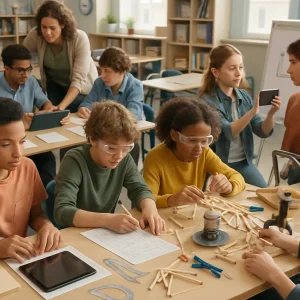
Lesson context: Middle-school STEM — “Design a small bridge for a classroom span.” Competence goal: design, build and test a bridge prototype and justify material choices using data.
Station plan (4 stations, 45–50 minute lesson)
- Prep time: 10 min intro + instruction
- Rotations: 4 × 10 minutes (build/test/record — include 1–2 min transitions)
- Final debrief / presentation: 10 minutes
Station details
- Station A — Research & Constraints (10 min)
- Task: Explore bridge types, constraints (span length, load), and list design choices.
- Materials: brief fact-sheets, tablets for research, design vocabulary sheet.
- Success criteria: record 3 possible designs and pick one with 2 supporting reasons.
- Support: printed examples with labeled parts; sentence stems: “I choose X because…”
- Checkpoint: 1-paragraph rationale uploaded or taped to table.
- Station B — Sketch & Plan (10 min)
- Task: Produce a labeled sketch showing dimensions, materials, and predicted load points. Estimate required material quantities.
- Materials: graph paper, pencils, templates, protractor.
- Success: clear sketch with dimensions; role assignments for build stage.
- Extension: calculate estimated weight using material densities.
- Checkpoint: teacher quick stamp + peer review tick-box.
- Station C — Build & Test (10 min)
- Task: Build to the sketch. Perform one formal loading test and record mass held.
- Materials: craft sticks, glue, tape, clamps, weights.
- Safety: goggles when using hot glue; space rules.
- Success: bridge spans gap; record test steps and mass until failure or stable load.
- Checkpoint: photograph of bridge with weight scale; test log signed by team.
- Station D — Analyze & Present (10 min)
- Task: Convert findings into a 90-second presentation + a one-page mini-report: what worked, what failed, next design changes.
- Materials: flipchart, markers, camera (phone) for recording.
- Success: presentation prepared; two clear data-supported conclusions.
- Checkpoint: upload photo and one-line conclusion to LMS; prepare to report in plenary.
Differentiation examples built into stations:
- Lower‑support: ready-made sketch template, sentence stems, guided test log.
- Extension: optimization challenge: “How to reduce weight while keeping load ≥ 500 g? Propose two changes and predict effect.”
Roles:
- Materials Manager (controls supplies)
- Lead Builder (follows sketch)
- Recorder/Reporter (documents test data, takes photo)
- Safety Officer/Timekeeper (enforces procedure & keeps time)
Teacher actions during rotation:
- Observe at 2–3 teams per station; give micro-feedback (1–2 min).
- Intervene only when safety or major misconceptions occur.
- Use checkpoint rubrics to add a quick assessment stamp.
- Note groups requiring follow-up; invite them to a mini-review station on next rotation.
Final evaluation:
- Summative rubric assessing design process (planning, testing, analysis), product (bridge performance), and teamwork/communication.
- Each group submits: photos, test data, 1‑page reflection, and 90‑second recorded presentation.
- Teacher gives written feedback and posts exemplars to LMS.
Evidence collection and sharing:
- Photograph artifacts and test logs.
- Upload to LMS class folder with student names and group roles.
- If oral output is used in class, write the key points on flipchart and photo it — ensure oral output becomes a document.